# 🧩 Deconstruct

***

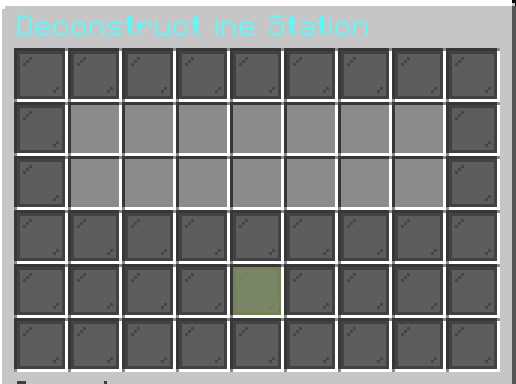
<figure><img src="https://1245303946-files.gitbook.io/~/files/v0/b/gitbook-x-prod.appspot.com/o/spaces%2FEMKTTfYtO1c14jr3rkcH%2Fuploads%2FoyINl1ZDWTNpT4MAtvid%2Fimage.png?alt=media&#x26;token=eb29a15e-8cad-44e6-8c7b-8fb428373d2a" alt=""><figcaption><p>GUI</p></figcaption></figure>

## ⚙️ How Deconstruct Works

The Deconstruct Station allows you to deconstruct multiple items at once.\
Its behavior is configured under `settings.deconstruct`.

## 🔐 Permission

Each station has its own permission requirement in order to be used.\
Of course, you can customize or change the permission to suit your needs.

```
settings:
  permission: nwmmoupgrade.deconstruct.test
```

***

## ⭐ Features

***

### **1. Material Item**

If enabled, this means the operation of the station will require the specified materials in order to function as intended.\
You can define one or more material items, and the station will only execute if the player provides the required materials.

<pre class="language-yaml"><code class="lang-yaml">materials:
  enabled: false
  items:
    - type: MATERIAL
      id: STEEL_INGOT
      amount: 5
      slot: 30
      #match-item-type: SWORD #filter option
<strong>      #match-tier-type: RARE #filter option
</strong>      #match-item:
      # - SWORD:KATANA
</code></pre>

**Note:**

* `type` is the type of the MMOItem.
* `id` is the ID of the MMOItem.
* `amount` is the quantity of the material required.
* `slot` is the GUI slot where the material must be placed.

#### **Options**

These are additional conditions that enhance material requirements:

* `match-item-type`:\
  The material will only be accepted if the item placed in the item slot has the matching `type` specified here.
* `match-item-tier`:\
  The material will only be accepted if the item placed in the item slot has the matching `tier` specified here.
* `match-item`:\
  The material will only be accepted if the item placed in the item slot has the matching According to the item defined in `match-item` specified here.

***

### **2. Chance Item**

If enabled and used in conjunction with chance-based mechanics, the Chance Item provides an additional success rate boost on top of the existing base chance.

This item acts as a support to increase the overall likelihood of success during actions such as upgrading.

```yaml
chance-item:
  enabled: false
  items:
    - type: MATERIAL
      id: RARE_DIAMOND
      amount: 5
      slot: 32
      chance: 50
      #match-item-type: SWORD #filter option
      #match-tier-type: RARE #filter option
      #match-item:
      # - SWORD:KATANA
    - type: MATERIAL
      id: SILVER_INGOT
      amount: 1
      slot: 32
      chance: 50
      #match-item-type: ARMOR #filter option
      #match-tier-type: RARE #filter option
      #match-item:
      # - SWORD:KATANA
```

**Note:**

* `type` is the type of the MMOItem.
* `id` is the ID of the MMOItem.
* `amount` is the quantity of the material required.
* `slot` is the GUI slot where the material must be placed.
* `chance` This sets the success chance for the Chance Item

#### **Options**

These are additional conditions that enhance material requirements:

* `match-item-type`:\
  The material will only be accepted if the item placed in the item slot has the matching `type` specified here.
* `match-item-tier`:\
  The material will only be accepted if the item placed in the item slot has the matching `tier` specified here.
* `match-item-tier`:\
  The material will only be accepted if the item placed in the item slot has the matching According to the item defined in `match-item` specified here.

***

### **3. Material Formula**

The Material Formula feature provides a highly flexible way to dynamically calculate the cost and material requirements for item.

#### Material Increase

When this feature is enabled (`enabled: true`), the quantity of material items required for an gem add socket will increase as the item's level rises. This ensures that higher-level upgrades demand a greater investment from players, providing a more balanced progression.

The increase is determined by a **custom formula** you define, giving you precise control over the scaling.

**In Short:**

* **Level Up = Material Requirements.**

#### Formula Configuration

The core of this feature lies in the `formula` field, where you can define a mathematical expression.

* **Basic:** you can use the basic default chance calculation or create your own custom formula to control how the chance is calculated.
* **Custom Placeholders:** The formula supports specific placeholders that will be replaced with dynamic values during calculation.

```yaml
material-formula:
  enabled: true
  formula: "1"
```

***

### **4. Cost Upgrade**

This feature allows you to use currencies such as PlayerPoints, CoinsEngine, or Vault.

```yaml
cost:
    enabled: true
    currency: pp
    amount: 5000
```

```yaml
cost:
    enabled: true # Enable/disable cost system
    currency: ce;nwcoin
    amount: "{ability_custom_advance_cost_item}" # cost amount
```

```yaml
cost:
    enabled: true # Enable/disable cost system
    amount: 100 # cost amount
```

***

### **5. Default Chance**

This feature allows you to set the success chance of this station yourself, in cases where Tier is not enabled.

```yaml
options:
    ....
    default-chance: 0
```

***

### **6. Deconstruct**

The Deconstruct Station uses a **group-based system** to determine which items are returned when an item is deconstructed.\
This behavior is divided into **check-group** and **groups** logic.

***

### 🔍 3.1 `check-group` Behavior

The **`check-group`** system determines **which group** should be used to generate the deconstruction results.

#### 🧠 How It Works

* The system checks the **category**, **item type**, and **item details** of items placed in the Deconstruct Station GUI
* If an item matches any condition defined in `items`, the system will use **`use-deconstruct-group`**
* The selected group controls which result items will be generated

***

#### ⚙ Supported Format

Each entry follows this structure:

```
MMOITEM;<type>;<id>;<tier>,<tier1>;<amount>
```

**Parameters**

* **`MMOITEM`**\
  Item source type
* **`type`**\
  MMOItem category (e.g. `SWORD`, `ARMOR`)
* **`id`**\
  MMOItem ID
* **`tier`** *(optional)*\
  Item tier(s). Multiple tiers can be separated by commas
* **`amount`**\
  Required amount of items to trigger this rule

> **Note:**\
> Tiers are optional. If omitted, the rule applies to all tiers.

***

### 📦 3.2 `groups` Behavior

The **`groups`** section defines the **result items** returned after a successful deconstruction.

Each group can have its own validation rules and result logic.

***

#### ✅ 3.2.1 `check-item: true`

When enabled:

* The group will **strictly validate** the items placed in the Deconstruct Station GUI
* All defined conditions must be met for the group to be applied
* Provides **full control** over both conditions and output items

This mode is ideal for precise, controlled deconstruction behavior.

***

#### 🎚 3.2.2 `check-tier: true`

When enabled:

* Result items are determined **based on the item tier**
* Each tier can have its own result configuration

**Fallback Behavior**

* If the item’s tier does **not** match any defined tier:
  * The system will automatically fall back to **`DEFAULT`** results

This ensures safe behavior even when tiers are missing or undefined.

***

#### 🔄 Deconstruction Flow

1. Item is placed into the Deconstruct Station GUI
2. `check-group` determines the appropriate group
3. The selected group validates the item (`check-item`)
4. Tier-based results are applied (`check-tier`)
5. Result items are generated and returned

***

#### Conditions

&#x20;Required Item are the results that players receive when the process is successfully completed.

Here is a table of condition types and their formats:

<table data-header-hidden><thead><tr><th></th><th width="216"></th><th width="223"></th><th></th></tr></thead><tbody><tr><td><strong>Type</strong></td><td><strong>Format</strong></td><td><strong>Example</strong></td><td><strong>Description</strong></td></tr><tr><td>MMOItems</td><td><code>MMOITEM;&#x3C;type>;&#x3C;id>;&#x3C;amount></code></td><td><code>MMOITEM;MATERIAL;RARE_DIAMOND;10</code></td><td>Requires a specific MMOItem and amount</td></tr><tr><td>Vanilla</td><td><code>VANILLA;&#x3C;material>;&#x3C;amount></code></td><td><code>VANILLA;STONE;15</code></td><td>Requires a specific vanilla item and amount</td></tr><tr><td>Placeholder</td><td><code>PLACEHOLDER;&#x3C;placeholder>;&#x3C;syntax>;&#x3C;result></code></td><td><code>PLACEHOLDER;%luckperms_groups%;==;default</code></td><td>Checks placeholder value matches result</td></tr><tr><td>Vault</td><td><code>vault;&#x3C;amount></code></td><td><code>vault;123</code></td><td>Requires the player to have a certain amount of money</td></tr><tr><td>Level</td><td><code>LEVEL;&#x3C;amount></code></td><td><code>LEVEL;123</code></td><td>Requires the player to have a certain level</td></tr><tr><td>CoinsEngine</td><td><code>COINSENGINE;&#x3C;currency>;&#x3C;amount></code></td><td><code>COINSENGINE;nwcoin;100</code></td><td>Requires the player to have a certain amount of money</td></tr><tr><td>PlayerPoint</td><td>playerpoint;&#x3C;amount></td><td><code>playerpoint;100</code></td><td>Requires the player to have a certain amount of money</td></tr><tr><td>Nexo</td><td><code>nexo;&#x3C;material>;&#x3C;amount></code></td><td><code>Nexo;Custom_block;15</code></td><td>Requires a specific nexo item and amount</td></tr><tr><td>ItemsAdder</td><td><code>ia;&#x3C;namespace>;&#x3C;amount></code></td><td><code>ia;&#x3C;test:test>;1</code></td><td>Requires a specific ItemsAdder item and amount</td></tr></tbody></table>

These conditions give you a flexible way to control when a player is allowed to process items.

#### Condition Syntax

PLACEHOLDER;\<placeholder>;\<syntax>;\<result>

Available syntax options include:

Examples:

* `"PLACEHOLDER;%player_level%;>=;30"`
* `"PLACEHOLDER;%luckperms_group%;==;vip"`
* `"PLACEHOLDER;%player_health%;<;10"`
* `"PLACEHOLDER;%some_placeholder%;has_value"`

These conditions give you a flexible way to control when a player is allowed to process items.

Here's an explanation in **simple English** of how to use `<syntax>` in:

```
PLACEHOLDER;<placeholder>;<syntax>;<result>
```

This condition checks the value of a **placeholder** using a **comparison operator (`<syntax>`)** and compares it with a **result**.

#### Available `<syntax>` Options:

| `<syntax>`                  | Meaning                | Example                        | Description                                  |
| --------------------------- | ---------------------- | ------------------------------ | -------------------------------------------- |
| `==` *(EQUALS)*             | Equals                 | `%player_level% == 10`         | True if the placeholder equals 10            |
| `!=` *(NOT\_EQUALS)*        | Not equals             | `%player_level% != 5`          | True if not equal to 5                       |
| `>` *(GREATER\_THAN)*       | Greater than           | `%player_level% > 20`          | True if greater than 20                      |
| `<` *(LESS\_THAN)*          | Less than              | `%player_level% < 15`          | True if less than 15                         |
| `>=` *(GREATER\_OR\_EQUAL)* | Greater than or equal  | `%player_level% >= 30`         | True if 30 or more                           |
| `<=` *(LESS\_OR\_EQUAL)*    | Less than or equal     | `%player_level% <= 50`         | True if 50 or less                           |
| `has_value` *(HAS\_VALUE)*  | Check if has any value | `%some_placeholder% has_value` | True if the placeholder is not empty or null |

#### Example Usages:

```yaml
- "PLACEHOLDER;%player_level%;>=;30"
- "PLACEHOLDER;%luckperms_group%;==;vip"
- "PLACEHOLDER;%player_health%;<;10"
- "PLACEHOLDER;%some_placeholder%;has_value"
```
