# 🔧 Custom Placeholders
Custom Placeholders are used to insert dynamic values into formulas for calculating **Cost**, **Chance**, or **Material** in various station systems.\
They enable flexible configuration by referencing player data, item stats, or other variables during calculation.
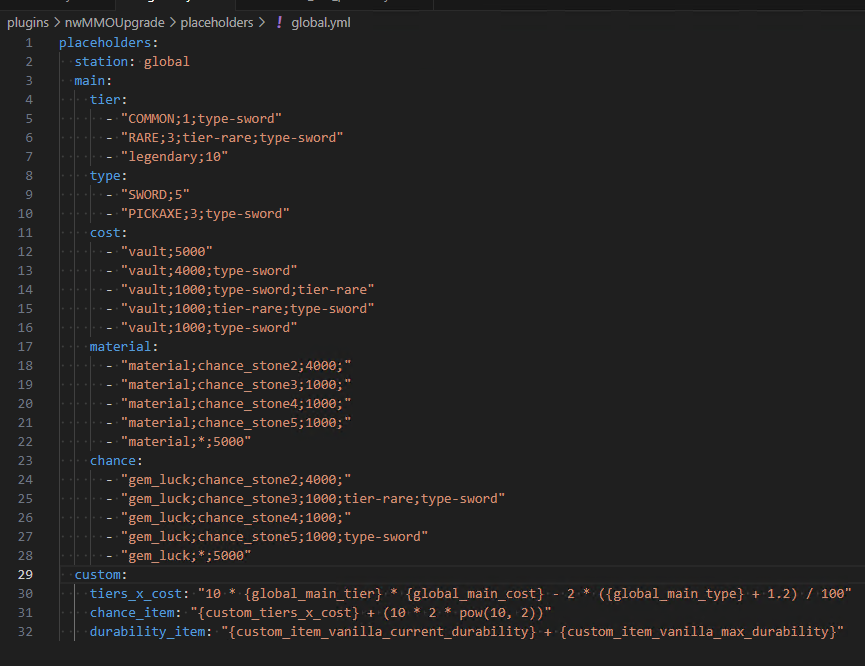
Example Custom Placeholder
## ⚙️ How Custom Placeholders Work
The Custom Placeholders feature allows you to define your own formulas exactly as you want. It is divided into two main types of usage:
#### **1. Global Station**
These placeholders can be used across all stations, applying universally to any formula where supported.
#### **2. Local Station**
These are used in specific stations such as Upgrade, GemAddItem, etc., and work only within their respective station configurations.
This setup gives you powerful control over how values like cost, chance, or material requirements are calculated, tailored to each station’s unique logic.
***
## 🌐 1. Global Station
The Global Station allows you to define a calculation formula that can be used across any station.\
It acts like a default or main formula that you want to apply to all stations universally.
This is useful when you want to maintain consistent logic across different features such as upgrade, reroll, or evolution, without repeating the same formula in each station’s configuration.
```yaml
placeholders:
station: global
....
```
***
## 🏛️ 2. Local Station
The Local Station lets you define a custom formula that **only applies to a specific station**.\
It cannot be used across other stations, making it ideal for cases where you want different logic or calculations for each station (e.g., upgrade vs. evolution).
```yaml
placeholders:
station: upgrade
....
```
This gives you more control and flexibility to fine-tune how each station behaves independently.
***
## 🧠 The Functionality of Custom Placeholders
The functionality of Custom Placeholders is divided into two main parts:
***
## 🔹 Main
The **Main** section defines how each category operates within the system:
***
### **1. Tier**
Checks the tier of the item placed in the Item slot.
If the item matches the specified tier condition, it returns the defined value as the result.
```yaml
tier:
- "COMMON;1;type-sword"
- "RARE;3;tier-rare;type-sword"
- "legendary;10"
```
***
### **2. Type**
Checks the type of the item placed in the Item slot.
If the item matches the specified type condition, it returns the defined value as the result.
```yaml
type:
- "SWORD;5"
- "PICKAXE;3;type-sword"
```
***
### **3. Cost**
Specifies the cost amount required.\
Works best when combined with filters like `type-` or `tier-` for more precise control.
```yaml
cost:
- "vault;5000"
- "vault;4000;type-sword"
- "vault;1000;type-sword;tier-rare"
- "vault;1000;tier-rare;type-sword"
- "vault;1000;type-sword"
```
***
### **4. Material**
Checks if the material item placed in the GUI matches the defined materials.\
If matched, it returns the assigned value as the result.
```yaml
material:
- "material;chance_stone2;4000;"
- "material;chance_stone3;1000;"
- "material;chance_stone4;1000;"
- "material;chance_stone5;1000;"
- "material;*;5000"
```
***
### **5. Chance**
Checks if the chance item placed in the GUI matches the defined chance conditions.
```yaml
chance:
- "gem_luck;chance_stone2;4000;"
- "gem_luck;chance_stone3;1000;tier-rare;type-sword"
- "gem_luck;chance_stone4;1000;"
- "gem_luck;chance_stone5;1000;type-sword"
- "gem_luck;*;5000"
```
***
## ⚙️ Options
* You can use **tier-** or **type-** as filters to refine matching conditions.
* Using **`*`** acts as a wildcard to match all IDs within the type.
* The system checks conditions **top to bottom** and stops at the first match.
* If none match → default result is **0**.
Example:
```yaml
chance:
- "gem_luck;chance_stone2;4000;"
- "gem_luck;chance_stone3;1000;tier-rare;type-sword"
- "gem_luck;chance_stone4;1000;"
- "gem_luck;chance_stone5;1000;type-sword"
- "gem_luck;*;5000"
```
***
## 🧮 Custom
The **custom** section allows you to define your own formulas that can be used in other parts of the system.
You can write any calculation using supported placeholders and mathematical expressions.
```yaml
custom:
tiers_x_cost: "10 * {global_main_tier} * {global_main_cost} - 2 * ({global_main_type} + 1.2) / 100"
chance_item: "{custom_tiers_x_cost} + (10 * 2 * pow(10, 2))"
durability_item: "{custom_item_vanilla_current_durability} + {custom_item_vanilla_max_durability}"
```
#### Referencing Format
```
{global_custom_}
```
Example:
```yaml
tiers_x_cost: "10 * 10"
```
Referenced as:
```
{global_custom_tiers_x_cost}
```
***
## 🧩 Using Formulas & Custom Placeholders
This system allows you to create complex formulas using in-game data.
***
## ➤ 1. Basic Formula Format
Supported operators:
```
+ - * / ^ or **
```
***
## ➤ 2. Available Variables
#### From the main item:
* `{level_item}`
* `{item_gem_socket}`
* `{item_empty_socket}`
* `{stats_}`
* `{item_id}`
* `{item_amount}`
* `{custom_item_vanilla_current_durability}`
* `{custom_item_vanilla_max_durability}`
* `{evolution_item_tier}`
#### General:
* `{_main_tier}`
* `{_main_type}`
* `{_main_cost}`
* `{_main_material}`
* `{_main_chance}`
***
## ➤ 3. Supported Mathematical Functions
* `pow(x, y)`
* `sqrt(x)`
* `log(x)`
* `min(x, y)`
* `max(x, y)`
* `avg(x, y)`
* `abs(x)`
* `ceil(x)`
* `floor(x)`
* `round(x)`
***
## ➤ 4. Formula Examples
#### **Example 1: Basic upgrade cost**
```yaml
custom:
upgrade_cost: "100 * {level_item}^2"
```
#### **Example 2: Complex stat-based formula**
```yaml
custom:
damage_formula: "({stats_ATTACK_DAMAGE} + {stats_STRENGTH}/5) * (1 + {level_item}/10)"
```
#### **Example 3: Statistical function usage**
```yaml
custom:
complex_formula: "max(100, min(500, {stats_ATTACK_DAMAGE}*2 + sqrt({stats_DEFENSE}*10)))"
```